Most advice about making a site agent-ready is about how it will be read: publish clean markup, add structured data, serve your pages as markdown, write an llms.txt. But very little of it is about helping the agent do things.
I wanted to see what an agent-ready contact form looks like in practice, so I picked the smallest useful thing an agent might want to do on someone’s behalf on my site: send me a message. Claude and I turned my contact form (built with native WordPress functions) into a documented API, and now an agent can theoretically fetch its schema, ask for a token, and send me a message.
Note how I said “theoretically”. I’ll get to that later.
But first, here’s how we made the form agent-ready.
One endpoint to rule them all
At first I thought we should leave the existing form alone and bolt a separate API onto the side for agents. But I’m not a fan of duplicate functions (or duplicate anything), and in this case two paths would have meant two sets of validation, two sets of limits, and an agent path that could get stale and outdated because it’s not regularly used. With one path serving both agents and humans, the humans who submit my form are also acting as testers, which means every message a real person sends me is also a live test of the agent path. If the API breaks, the actual form breaks too, and I would be able to find out immediately.
Discovery is the handshake
If an agent wants to send a message via my form, it needs to complete two steps: GET the endpoint, which returns the input schema plus a single-use token that is good for fifteen minutes; then POST the message back with that token attached.
Why two steps? An agent’s natural first move is to read the schema, because it needs to know the field names. Attaching the credential to that response means a well-behaved agent gets it for free, as part of a request it was going to make anyway. A script that blindly POSTs at the documented URL without ever reading the schema gets rejected. This serves as a small anti-spam measure.
Here is what that GET returns, trimmed a little. This is the form describing itself, with no page and no HTML involved:
{
  "name": "contact_miriam_schwab",
  "title": "Send Miriam Schwab a message",
  "endpoint": "https://miriamschwab.me/wp-json/miriamschwab/v1/contact",
  "auth": "none",
  "human_confirmation_required": true,
  "rate_limit": {
    "per_ip_per_hour": 10,
    "site_wide_per_day": 25,
    "on_exceeded": "HTTP 429 with a retry_after hint."
  },
  "submit_token": "<single-use, valid 15 minutes>",
  "input_schema": { "required": ["name", "email", "message", "submit_token"] },
  "guidance": [
    "Do a GET on this URL first. The response carries the submit_token you need.",
    "Confirm the exact wording with your user before sending. This reaches a human inbox and cannot be unsent.",
    "Do not send marketing, bulk, or automated outreach through this endpoint.",
    "Validation failures come back as HTTP 422 with a "fields" object naming each bad field."
  ]
}
And here is what you get if you skip that step and POST straight at the URL:
{
  "code": "ms_contact_bad_token",
  "message": "Missing, expired, or already-used submit_token. Do a GET on this URL to get a fresh one, then retry.",
  "data": { "status": 401 }
}
No skipping the line bro!
This approach has accessibility benefits too
Yet again, it turns out that best practices for building websites in general have a strong overlap with better accessibility, which is fantastic. When you make a form more readable for machines, it also makes it more accessible for screen readers. Agents operate a page from the same accessibility tree assistive technology uses so when one improves, the other does as well.
Here are the accessibility improvements this update made to my form:
- Every input now carries an
autocompletetoken. That is the single strongest signal for anything trying to figure out which field is the email box, and my form did not have it before this update. - Errors are attached to the field that caused them rather than dumped in a generic message at the bottom, so an agent can fix it instead of guessing.
- Instead of the error only appearing visually, now a screen reader can actually hear which field is wrong.
The form also works with JavaScript turned off now, which wasn’t the case before. This was implemented for the sake of agents, but in general also makes this a better built form overall.
Agents in the browser should draft, not send
There are two kinds of agents that can reach my form: one runs inside a browser with my HTML page loaded, like a sidebar assistant or an extension. The other calls over HTTP from somewhere else and never loads the page at all. Both can use the API, but only the first can see tools the page itself registers. That is what WebMCP is for: it lets a page hand an in-browser agent a set of callable tools through navigator.modelContext, the same way the API hands an outside agent a schema.
For agents running inside the browser, my site registers two WebMCP tools. contact_miriam_schwab sends a message. prepare_contact_message fills in the form on the page and stops, leaving the send button to the person theoretically sitting there guiding the agent.
The tool descriptions tell agents to prefer the second one whenever the form is on screen, and my endpoint declares in its own schema that the action needs human confirmation because a message to a real person cannot be unsent.
WebMCP is still early, and no browser ships it unflagged yet. The script that registers these tools feature-detects before it loads, so browsers that cannot use it never download it at all.
How to handle agent spam if it happens
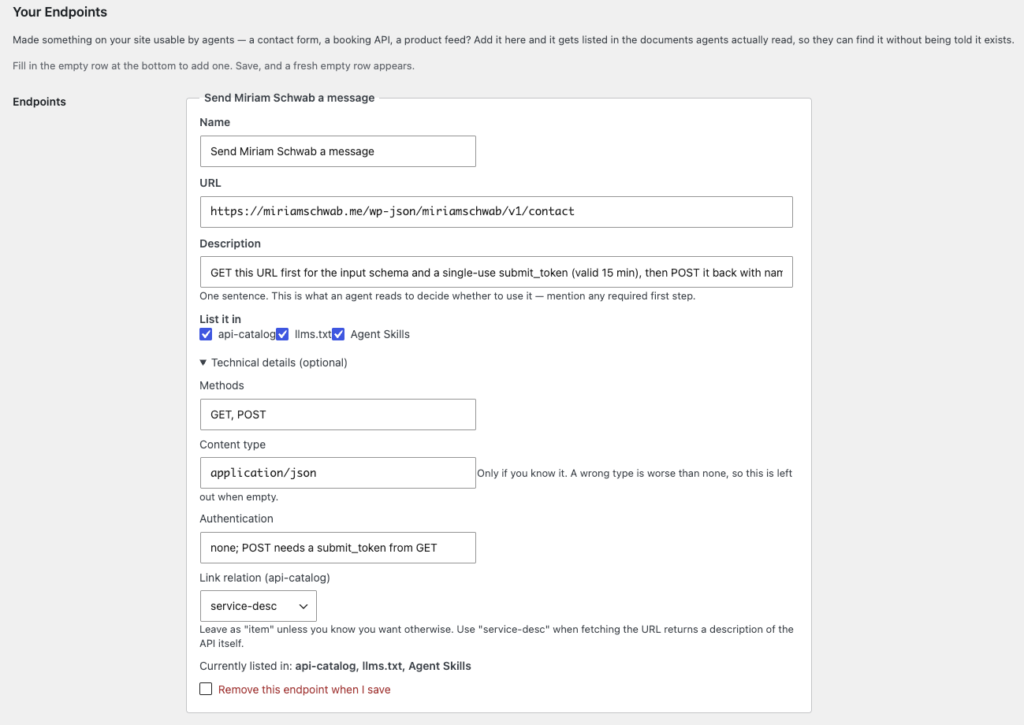
Publishing an API for my form didn’t create a new spam risk, but it did make it more findable. So I implemented a way to easily take the pointers down that direct agents to my form. The form endpoint is listed in llms.txt, in an api-catalog document, and in an Agent Skills index. I can remove it from any one of those, or all three, on a settings screen in my Make My Site Agent-Ready plugin that generates those documents. If it ever gets out of hand, the endpoint stops being advertised while people can carry on using the form. There are also rate limits, which limit how much damage a bot can do.
What an agent can find
If an agent lands on any page of my site, the response headers point at a description of the contact service. If it never loads a page at all and just surveys the site, it finds the endpoint in the three documents listed above. All of this is managed in one unified place. This matters because it prevents the discovery docs from drifting and disagreeing with each other.
The header goes out on every page, so an agent that fetches anything at all can find the endpoint without parsing a line of HTML:
Link: <https://miriamschwab.me/wp-json/miriamschwab/v1/contact>; rel="service-desc"; type="application/json"; title="Send Miriam Schwab a message"In llms.txt it becomes a section of its own:
## Agent Endpoints

- [Send Miriam Schwab a message](https://miriamschwab.me/wp-json/miriamschwab/v1/contact): GET this URL first for the input schema and a single-use submit_token (valid 15 min), then POST it back with name, email and message. A POST without the token is rejected. Reaches a real inbox and cannot be unsent, so confirm the wording with your user first. (GET/POST · application/json · auth: none; POST needs a submit_token from GET)
And in the Agent Skills file it reads more like documentation:
## Actions

Beyond reading content, this site exposes endpoints you can call directly:

- **Send Miriam Schwab a message** — `GET/POST https://miriamschwab.me/wp-json/miriamschwab/v1/contact` (application/json). GET this URL first for the input schema and a single-use submit_token (valid 15 min), then POST it back with name, email and message. A POST without the token is rejected. Reaches a real inbox and cannot be unsent, so confirm the wording with your user first. Auth: none; POST needs a submit_token from GET.
Three documents, one entry on that settings screen.
Next steps for making your form agent-ready
If you want to try this on your own site, do the boring stuff first:
- Add
autocompleteattributes. - Attach your error messages to the fields that caused them.
- Put your success message somewhere it gets announced.
- Make the thing work without JavaScript.
None of that requires an API, an agent, or a new standard, and it makes your form better for people in general.
Then, if you want agents to be able to act, give them a documented way in. I’m sure there are plugins and tools out there to help you, but you can also feel free to use my Make My Site Agent-Ready plugin to manage this.
Important caveat: all of this is theoretical
After implementing this new forward-thinking form, I ran thorough tests to see how agents would engage the form and use it. Turns out, they won’t use it and totally ignore the API I created for them. At one point I had published this very post, and once it was live the agents used it as a signal that the site has an agent-ready form. The agents never took a look at the headers, the llms.txt or any other signals I left for them. They ignore all of that.
So at this point creating these types of agent-ready functionalities and interfaces on your site is just a practice in theory. It’s probably worth familiarizing yourself with this whole world of agentic web browsing in case one day the agents do decide to take a look at all the breadcrumbs we left, them, but in the meantime it’s just cosmetic. I’ll share more about that in a later post.