The WordPress AI team has been working on native integrations for AI, based on the “building blocks” approach they laid out in July 2025.
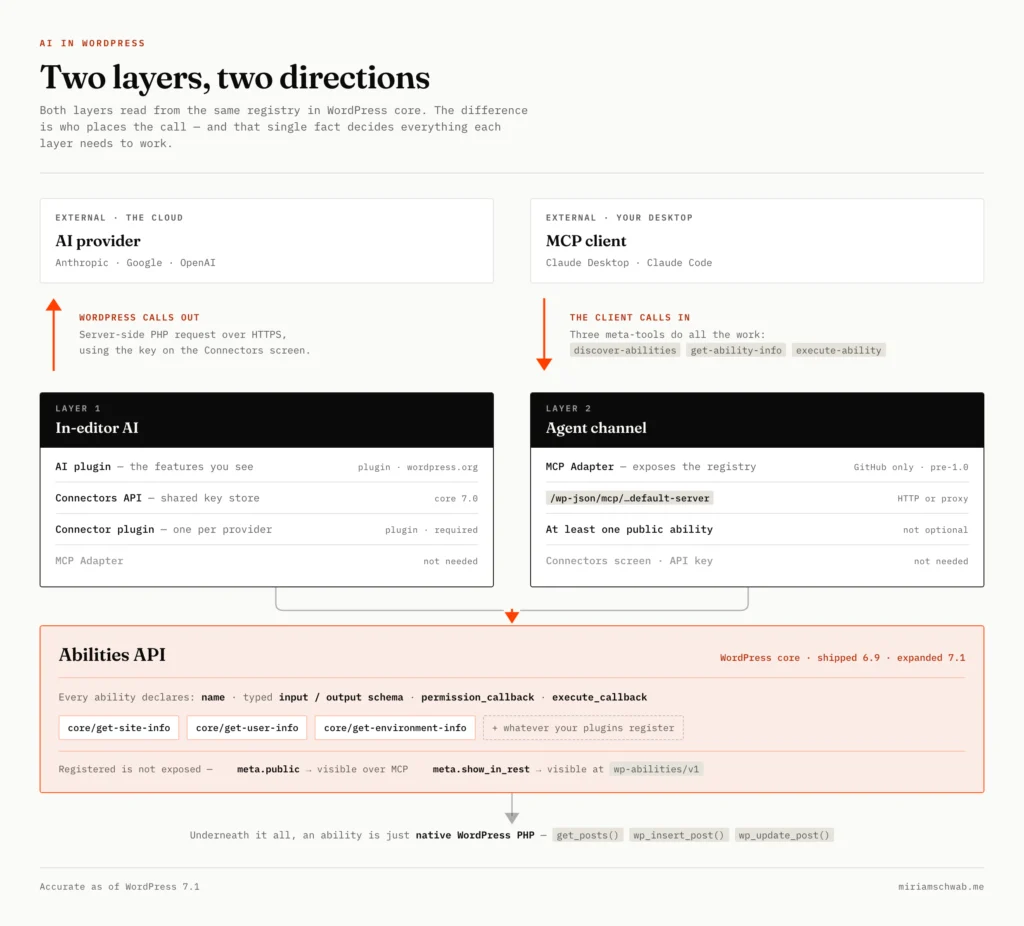
AI in WordPress has two distinct layers:
- The first is what I’ll call the “in-editor” AI: features that appear as UI elements in the content management experience, like category suggestions and alt text generation, surfacing directly in the editor while you’re writing.
- The second is the agent channel, which is a way for an external AI tool like Claude to connect to your site, discover its capabilities, and take actions on your behalf.
Here are the building blocks. All four now exist, though they’re at very different levels of maturity:
PHP AI Client SDK — a shared infrastructure Composer package that handles AI provider connections for any WordPress plugin. Plugin developers build against the PHP AI Client rather than rolling their own provider integrations; site owners configure providers once for their site rather than repeatedly per tool or plugin.
Abilities API — in some ways the star of the show. It’s what turns WordPress functionality into a discoverable, interactive system for AI agents, automation tools and more. It’s useful not just for LLMs, but for extending and working with WordPress overall.
MCP Adapter — this is specifically and only for the agent layer. It allows external agents to connect and interact with WordPress sites. The agent’s capabilities depend entirely on the abilities exposed via the Abilities API.
AI plugin (formerly the AI Experiments plugin) — the building blocks above are the “rails” of this initiative, and you can install and activate all of them without ever seeing an AI feature in your site. The AI plugin is what puts AI in front of users, adding its own settings screen and the UI elements in the content management experience that let people actually get AI assistance in their work.
The foundation: WordPress’ Abilities API
Everything starts with the Abilities API, which shipped in WordPress 6.9 and was expanded substantially in 7.1. It’s a standardized registry where plugins, themes, and WordPress core can declare what they’re capable of in a machine-readable format. Each ability has a name, a typed input and output schema, a permission callback, and an execute callback.
Think of it as a formal, discoverable API layer sitting on top of everything WordPress can do. It’s the shared registry that both AI layers (in-editor and agent) draw from, though they use it in different ways. This direction is the same open-extensibility move WordPress has always made, just aimed at a new kind of consumer.
Core ships three abilities: core/get-site-info, core/get-user-info, and core/get-environment-info. They live in two core categories, site and user. WordPress 7.1 gave all three consistent, translatable schemas and an optional fields parameter, so a caller can ask for just the fields it needs instead of the whole payload — a small change that makes an impact when the caller is paying for every token it reads.
The registry also has its own REST API, independent of anything AI-related: /wp-json/wp-abilities/v1/abilities lists what’s registered, /categories lists the categories, and /abilities/{name}/run executes one. Whether a given ability shows up there is controlled per-ability by a show_in_rest meta flag. Registered is not the same as exposed — a distinction that comes back with MCP below.
Three abilities is a deliberately thin starting point. The WordPress AI plugin (more on that below) registers more to back its own features, and now ships an Abilities Explorer for browsing all Abilities registered on your site, plus support for registering custom abilities. But the real “magic” (that hasn’t yet been widely embraced by developers) is when plugins ship abilities of their own.
Worth noting: the Abilities API wasn’t designed exclusively for AI. It’s a general-purpose integration primitive — the stability of its schema makes it valuable for any kind of integration, whether that’s AI agents, CLI tools, REST endpoints, or automation pipelines. That said, AI is clearly what’s driving development, and in practice most of the abilities being built will be for AI use, so for most developers and site owners, AI-readiness is the story here.
Layer one: in-editor AI
Two separate pieces work together here: the Connectors API, which landed in WordPress 7.0 core, and the AI plugin, which you install yourself.
The Connectors API adds a Settings → Connectors screen to the WP Admin. It’s described as: “All of your API keys and credentials are stored here and shared across plugins. Configure once and use everywhere.” Anthropic, Google, and OpenAI are featured there and install in a click, but the provider implementations are separate connector plugins. Configure a key once and every feature on your site that wants a model can use it.
One thing to know before you paste a key in: in the current release those keys are stored in the database unencrypted, though they’re masked in the UI. WordPress checks environment variables and PHP constants before it checks the database, so that’s the safer place to put them. The AI plugin has since added key encryption of its own.
How it works technically: WordPress makes a server-side PHP call to the AI provider’s API. The intelligence lives in the cloud, but the interaction is triggered and mediated entirely by WordPress. WordPress is calling the AI.
More connectors can be created, and have been. The community has released connectors for Grok, Mistral, Ollama, and more.
The AI plugin uses that configured provider to power contextual assistance while you write, and it has grown a lot: alt text generation, content classification, excerpt generation, title and slug generation, meta descriptions, summarization, translation, editorial notes, comment moderation, and image generation and editing, among others. Everything is opt-in through an experiment framework, so each feature has to be enabled explicitly. Once I turned things on, what showed up in the post editor was category and tag suggestions in the sidebar, excerpt generation, Generate Featured Image, Generate Meta Description, editorial notes, Generate Summary, and a title generation button that appears when you click into the title field.
My experience with this:
- Category and tag suggestions work and can be useful, but they’re not perfect. For example, it suggested the irrelevant “Static Site” category for a post about WordPress AI infrastructure.
- Image generation requires a provider that supports it. At first I had only connected an Anthropic API key, but Claude is text-only. For AI-generated featured images you need Google or OpenAI, so I added an OpenAI key too and then image generation worked.
- I asked it to create a featured image for a post, and it created something related, but terrible. I’m not sure what exactly the “prompt” is that gets passed from the post to the AI call, but it’s not effective. It would be better if you could see the prompt first and tweak it before submission, or adjust it after seeing a version of the image.
- I tested image generation in the Media Library, and that gave better results, probably because I was able to enter the prompt manually.
- There are some other useful features in the Media Library. You can click on an image and generate alt text right there, and when you save a generated image to the library it writes alt text for it in parallel.
A thought about AI token usage
Image generation is not cheap, and once I saw how resource-intensive a single request was, it made me wonder how we prevent LLMs from “running away” with opaque actions that rack up token costs. The plugin has since grown two features aimed at exactly that: AI request logging, so you can see what was actually called, and connector approvals, so a request has to be authorized before it goes out.
Layer two: the agent channel
The second layer runs in the opposite direction, and this is the one I actually use.
Instead of WordPress calling an external AI, an external AI calls WordPress. You have a conversation, you direct Claude to do something, and Claude acts on your site through a standardized channel. The AI is calling WordPress.
This is made possible by the MCP Adapter plugin, which takes anything registered in the Abilities API and exposes it via the Model Context Protocol. MCP is the open standard that lets AI tools like Claude discover and call external capabilities. With the MCP Adapter installed, your WordPress site becomes an MCP server. Note that the adapter is still GitHub-only — it’s not in the WordPress.org plugin directory, so you won’t get update notifications for it — and still pre-1.0, so it’s got a way to go.
The server lives at /wp-json/mcp/mcp-adapter-default-server, and clients can point at it over HTTP directly. For Claude Desktop you can also go through a proxy package called @automattic/mcp-wordpress-remote:
"wordpress-yoursite": {
  "command": "npx",
  "args": ["-y", "@automattic/mcp-wordpress-remote@latest"],
  "env": {
    "WP_API_URL": "https://yoursite.com/wp-json/mcp/mcp-adapter-default-server",
    "WP_API_USERNAME": "your-wp-username",
    "WP_API_PASSWORD": "your-application-password"
  }
}
A few things that aren’t obvious:
The adapter doesn’t expose one MCP tool per ability. This surprised me. The default server exposes three meta-tools — discover-abilities, get-ability-info, and execute-ability — and the agent uses those to find and run whatever is registered. So the tool list stays the same size whether you have three abilities or fifty, and the agent looks up what it needs when it needs it.
Abilities aren’t exposed to MCP by default. An ability needs a public flag in its meta (either meta.public or meta.mcp.public) before the adapter will surface it. When I first set this up, the three core abilities didn’t carry that flag and I needed a filter to add it. As of WordPress 7.1 core sets it itself, so that workaround is no longer necessary — but anything you register yourself still needs the flag set explicitly.
Strip the spaces from application passwords. If you go the proxy route: when you generate an application password in WordPress (under Users), it’s displayed with spaces for readability, e.g. xGnK JyJZ PPCa wnZ7. Paste that as-is into WP_API_PASSWORD and the proxy won’t strip them for you — authentication just fails, silently.
Building custom abilities
Core’s three abilities, plus whatever the AI plugin registers, won’t get you far. For real content management work — listing posts by category, creating drafts, updating excerpts in bulk, managing tags — you need to register your own.
Each ability’s execute_callback calls native WordPress PHP functions directly: get_posts(), wp_insert_post(), wp_update_post(), and so on. The Abilities API is not a wrapper around REST endpoints — the abilities themselves are just PHP. Core exposes the registry over REST, and the MCP Adapter exposes it over MCP, but those are two different views onto the same registry, not the registry itself.
The pattern looks straightforward but has a few silent failure modes that cost time.
The hook sequence matters and is not documented clearly. Register categories on wp_abilities_api_categories_init and abilities on wp_abilities_api_init. Using init at any priority returns null silently — the registry isn’t ready and there’s no error.
Your category has to exist first. Passing a category that isn’t registered returns null, with no complaint. And there’s no core category to attach to even if you wanted one — core registers site and user, and that’s it. Register your own.
The category field is required. Omitting it causes the same silent null.
Here’s the structure that works:
add_action( 'wp_abilities_api_categories_init', function() {
    wp_register_ability_category( 'myplugin', [
        'label'       => 'My Plugin',
        'description' => 'Abilities for my plugin.',
    ]);
});

add_action( 'wp_abilities_api_init', function() {
    wp_register_ability( 'myplugin/get-posts', [
        'label'               => 'Get Posts',
        'description'         => 'Retrieve posts with optional filtering.',
        'category'            => 'myplugin',
        'input_schema'        => [ /* ... */ ],
        'output_schema'       => [ /* ... */ ],
        'permission_callback' => fn() => current_user_can( 'edit_posts' ),
        'execute_callback'    => function( $input ) { /* ... */ },
        'meta'                => [
            'public'       => true,
            'show_in_rest' => true,
            'annotations'  => [
                'readonly'    => true,
                'destructive' => false,
                'idempotent'  => true,
            ],
        ],
    ]);
});
Those annotations are worth filling in properly. They tell an agent whether an ability reads or writes, whether calling it twice is safe, and whether it can destroy something — which is exactly the information a client needs to decide what to do without asking you first.
WordPress 7.1 also added hooks around ability execution. wp_ability_invoked fires at the start of every call, before validation and permission checks, and wp_ability_validate_input and wp_ability_validate_output let you supplement schema validation with your own rules. If you want an audit trail of what an agent actually did on your site, that’s where it goes.
One thing worth thinking about when designing abilities: not every technically accessible ability makes a good AI tool. The meta-tool pattern means the raw count matters less than it used to, since the agent discovers abilities on demand rather than loading all of them up front. But the shape still matters. Fewer, more robust abilities perform better than many small granular ones — better to give the agent a single ability that handles categories and tags in one step than three separate abilities it has to chain together. Self-documenting descriptions, clear error messages with next steps, and predictable output shapes all matter too. Turns out that as usual, building things for humans is also good for machines: the same things that make an API good for humans also make it good for AI.
What the agent channel unlocks
Claude and I built a custom plugin called MS WordPress Abilities that extends the default set — one of several things Claude and I have built on this site together. We started with the three core abilities and a filter to expose them to MCP, which core has since made unnecessary. Then we built get-posts (retrieve and filter posts by category, tag, status, and search), create-post (create drafts from conversation notes), and get-categories (list all categories with post counts, which turned out to be immediately useful for spotting a duplicate “Artificial Intelligence” category that the AI plugin had created alongside the existing “AI” category).
Building these taught me most of what’s in the section above: the silent null failures, the category requirement, the hook sequence. None of it is documented clearly, and it took quite a bit of trial and error.
After running on these abilities for a while, things were going well, but I wanted Claude to be able to do all the things, without limitation. So I gave Claude WP REST API access, with guardrails in place of course.
Once the agent connection is working, and especially once you’ve gone beyond the core set, the experience is genuinely good. Claude can do a lot for me: updating SEO metadata per post, finding posts that are missing featured images, finding images with no alt text and writing it, internal linking analysis. I can ask it to list all posts in a specific category and it reads from the actual site. I can ask it to create a draft from notes I share in the conversation and the draft appears in wp-admin. I can say “find all posts missing excerpts and suggest replacements” and it reads the post content, generates suggestions, and makes the changes directly. It’s also how I run the monthly routine that keeps this site healthy.
The sweet spot is work that would otherwise mean clicking through a lot of wp-admin screens: bulk content improvements, cross-post analysis, anything where the tedium is the actual obstacle.
The permission model is native WordPress. Every ability has a permission_callback that checks user capabilities. I created a dedicated WordPress user for Claude with Administrator access, but you could scope it to Editor or a custom role with only the specific capabilities the agent needs.
Two layers, two directions
To sum up: the in-editor AI is WordPress calling an external AI API (I manage things within the WP Admin). The agent channel is an external AI calling WordPress (I manage things from within Claude). They run in opposite directions, which is why their dependencies are almost entirely separate.
For in-editor AI you need: the AI plugin, at least one connector plugin (Anthropic, Google, and OpenAI install in a click from the Connectors screen), and your API key saved there. You do not need the MCP Adapter.
For the agent channel you need: the MCP Adapter, an MCP client like Claude, and at least one ability actually exposed. That last one isn’t optional: an MCP server with nothing public on it gives the agent nothing to do. You do not need the Connectors screen or an API key, since the intelligence lives in the client, not in WordPress.
The Abilities API sits underneath both, and abilities registered by any plugin are available to both channels.
The bigger picture
What we see here leans heavily towards infrastructure thinking rather than feature thinking. The Abilities API, the MCP Adapter, the PHP AI Client, and the Connectors API are all pieces of the same architecture: establish a standard and let the ecosystem build on it, just as WordPress has always done. Agent Skills are part of the same pattern.
The foundations are solid, and 7.1 went almost entirely into deepening them rather than adding user-facing features. The features built on top, at least in the AI plugin today, are still rough in places: rate limit errors, inconsistent suggestion quality, and a few settings that don’t obviously surface in the editor UI. The architecture is still much stronger than the features.
But the architecture is the part that matters most right now. It’s what makes it possible for Elementor, Yoast, WooCommerce, and any other plugin to add AI capabilities that share credentials, share the standard, and work with the same agents. The compounding effect of an open ecosystem where every plugin can participate in the AI layer is what WordPress’s open extensibility has always been about.
The catch is that the compounding only happens if plugins actually show up. Core has done its part; the ecosystem largely hasn’t yet, which is a much harder problem than shipping an API.
The plugin I built for this is MS WordPress Abilities. It handles the category registration and custom post management abilities, including a two-step preview/apply pattern for safe agent-driven content updates. If you’d rather make your site legible to agents that aren’t logged in at all, that’s a different job — see Make My Site Agent-Ready.