You may notice that there’s a chat bubble in the bottom right corner of this site. I created that for fun, to see what kind of self-contained chat experience I could create with AI, that’s powered by AI.
People actually chat with it, and it’s great to see it’s being used. A few people have asked my site chat recently about how it works – does it use JavaScript, does it only work well on small sites, etc. I’m really glad my site visitors are curious, so here’s an explanation about how this chat works; and once this post is live on the site, from now on if people ask about it, the chat can share this as a reference. Very meta 🙂
This site’s chat isn’t a search function
Many people assume a site chatbot works the way search does: you ask something, the software finds the three or four most relevant pages, and those get sent to the AI. That’s retrieval, usually built on embeddings and a vector database.
That’s a great way of doing things, but my site is relatively small, and I wanted to keep this solution compact and smart, so my plugin doesn’t do any of that fancy search stuff. It reads every published item on the site, mashes the whole thing into one long plain-text blob, and sends that entire blob to Claude with your question attached. There’s no indexing, no similarity scoring, no vector store and no ranking: the model gets the whole site and picks out the information it needs.
That might sound wasteful, and at a certain size it would be. At my site’s size it’s the cheapest and most efficient way to offer this. If I had gone with a retrieval method, I’d likely have to deal with issues around wrong answers due to pages never making it into the context, and things like that. Since my chat plugin draws every answer from everything, issues are easier to troubleshoot.
What goes into the blob
When the plugin builds the index, it goes through each post type selected in the plugin’s settings and pulls every published item, reading each one’s text out of post_content.
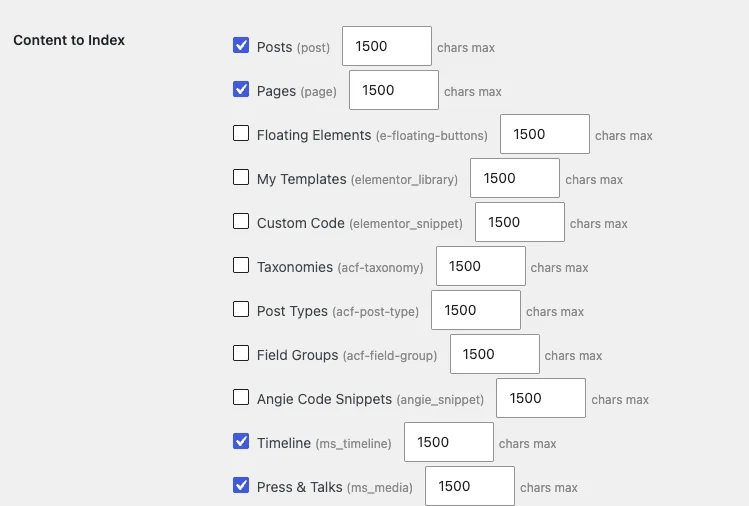
For each one it writes a short record: the type label, the title, the permalink, the content stripped of tags and collapsed to single spaces, the excerpt, and for regular posts it includes the categories and tags. Records are separated by a --- line, which is enough structure for the model to tell where one page ends and the next begins.
But not all content lives in post_content, like Advanced Custom Fields content, or Elementor’s posts. Here’s how those are handled:
- If Advanced Custom Fields is active, every string-valued field and every flat array field also gets appended with a human-readable label, so a checkbox field named
speaking_topicsshows up in the context as “Speaking Topics: …”. Field values get their markup stripped and are capped at 500 characters each, for reasons I’ll come back to further down. - If a site is built with Elementor, most of the visible text sits in a JSON structure in post meta. The plugin parses
_elementor_data, reviews the element tree recursively, collects anything in the settings keys that hold visible text, and uses that version if it’s longer than whatpost_contentgave it. Without that step, an Elementor page would end up in the index as only a title and a URL, with no associated content.
There are two caps in place. The blob cannot be larger than 200,000 characters, which is equivalent to roughly 50,000 tokens, and each individual post cannot contribute more than 1,500 characters of content by default, which stops one enormous page from eating the whole budget. That per-post figure is set per post type.
How the cache works
For the purposes of my site, the plugin doesn’t really need caching, but I added it anyway because it was just a matter of four lines of code to add the invalidation hook, and the database work felt unnecessarily wasteful. Building that index meant a database query per post type plus meta lookups for every single item – doing that on every chat message would be silly, so the assembled string is stored as a WordPress transient with a 12-hour life. The plugin also hooks save_post so the transient is deleted whenever anything is saved on the site, skipping autosaves and revisions, which keeps the blob fresh. If a new post is published, the next question rebuilds the index with it included.
The 12-hour expiry is there as a fallback in case content changes without a post save, which can happen.
What happens on a chat request
The chat widget posts to /wp-json/site-chat/v1/ask with a single field, the question, validated to between 1 and 500 characters. The endpoint is public and unauthenticated, and it has no nonce. It used to have one but it was leading to an “Invalid request” error: the nonce was printed into the page HTML, which on a site behind a full-page CDN cache means the edge holds it for days while WordPress expires it after 12 to 24 hours. This led to the error from a token that had gone stale in cached HTML.
A nonce seems like a good idea because it protects against cross-site request forgery, but in addition to causing technical issues, it was protecting against something that didn’t exist: there’s nothing to forge here – no session, no privileged action, nothing written. So it was removed, and the per-IP rate limiter takes care of the actual abuse defense.
That limiter is a transient keyed on a hash of the IP, defaulting to 10 requests per hour. If a bot hits the limit, it will get a 429 error, and the site admin (in this case me) will get one email per IP per hour notifying them that it happened.
Once a request clears the limiter, the plugin builds the system prompt. That’s the standing instruction set the model receives alongside the question, and the visitor never sees it: the site name and tagline, a set of behavior rules, whatever was typed into the plugin’s custom instructions box, and then the content blob under a SITE CONTENT: header.
The rules around the response are mostly about restraint:
- Answer only from the content provided.
- Say when something isn’t covered.
- Never make things up.
- When you link to a page, use the exact URL listed for that page rather than an archive, and never link off-site.
- Keep Markdown light, since answers are presented in a narrow bubble.
- End every answer with “Can I help you with anything else?”
The whole thing runs on the claude-haiku-4-5 model in one call with max_tokens set to 512. The reason it’s using Haiku rather than Sonnet or some other fancier model is that this is factual lookup in text that’s sitting right there in the prompt, so it doesn’t need reasoning or writing. My testing indicated that a bigger model wouldn’t necessarily answer these questions better.
Note that the chat has no memory
Every request starts from zero. There’s no conversation history, thread, or memory of what was asked 10 seconds ago. If a user asks a follow-up that depends on their previous question, the chat will not understand. The “Yes please” button after each answer doesn’t call the API at all, it just clears the buttons, prints a line, and puts the cursor back in the input.
Rendering the answer safely
At first the responses were returned without formatting, or with the Markdown markup visible in the output.
The model replies in Markdown, so the widget has to turn that into something the browser can display. There’s no Markdown library in the plugin, and there’s no innerHTML call anywhere in it either.
To solve the formatting challenge, the widget builds the answer one element at a time using createElement and textContent, and it checks every link against a pattern that only allows http and https addresses. This cautionary approach is deliberate, because an answer could contain code which the browser could theoretically run. Building each element one by one prevents that from happening. In the worst case, the chat might output an answer that looks a bit odd, which is better than a security issue! I have written before about how badly trusting web content can go, and I would rather not find out the hard way here.
The parser handles bold, italics, inline code, links, bare URLs, headings, bullet and numbered lists with nesting, blockquotes, and horizontal rules. Inline parsing is recursive, which matters because an earlier version printed **[title](url)** into the bubble as literal characters instead of a bold link, since it stopped parsing once it reached the bold. Headings render as styled paragraphs rather than real h1 and h2 elements, because headings don’t semantically belong in a floating widget.
How much content can this plugin handle?
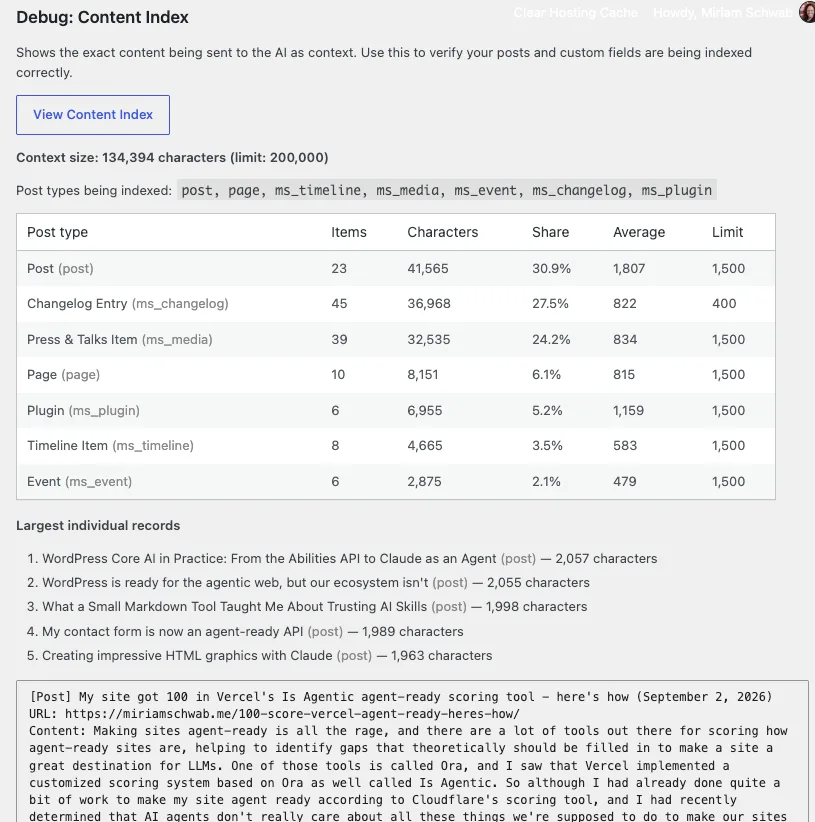
Now the size question: my site (as of today) has 136 published items across posts, pages, and five custom post types. That comes to 134,394 characters, or about 33,000 tokens of content, all of which is included in every single question submitted to the chat.
As mentioned, the plugin’s cap is 200,000 characters, which is a limit I actually set. Haiku takes up to 200,000 tokens, and 200,000 characters is roughly 50,000 tokens, so the blob could be around four times bigger before the model struggled with it. But I’d rather keep it lean than find out what a bloated prompt does to answer quality. At 134,394 characters I’m using 67 percent of my own budget across 136 items, with an average record size of about 1,000 characters.
A site full of long-form articles averaging 1,500 characters per post, plus the type label, title and URL wrapped around each one, would reach the character budget at around 115 posts. So this plugin works well on sites with somewhere between about 115 and 300 posts, depending on how long your writing is.
What happens when your content goes over the cap limit?
If the number of characters in your posts goes over the cap, nothing breaks, but whatever content is past the 200,000 character point is dropped from the blob and stops getting included in answers.
The content that’s dropped is whatever is at the end, the end being determined by iteration order: post types are processed in the order they’re listed, newest first inside each type. Your oldest items in your last-listed post type are the ones that go first.
This is why the plugin’s settings page has a “View Content Index” button that prints the exact character count next to the limit, a breakdown of where those characters go by post type, the largest individual records, and the full text being sent in the blob. If you’re wondering whether the plugin suits your site size, you can just install it, click that View Content Index button, and see what number you get back. If it says 190,000, you’re a few posts from losing content and may need to reconsider, or optimize the content that’s included (see below for more on that).
Keeping the index lean
While I was writing this post I measured the index properly for the first time in months, and the character count was higher than expected: 166,401 characters. I thought I was only at 40 percent of the cap, but this showed me I was closer to 83 percent. My item count hadn’t increased that much since I last measured, so the growth had to be coming from inside the records rather than from new ones. An analysis surfaced three ways to get the character count down:
- The first was a bug. Custom fields were going into the index with their markup intact, because the plugin stripped tags out of post content but left it in for ACF. Most of my press and talks entries carry an embed field, so every question a visitor asked was shipping iframe attributes to Claude. One post was worse than the rest: it had an embed of another WordPress site, which arrives with WordPress’s own embed script attached, so the entire minified contents of wp-embed.min.js were being added to the blob! I fixed this, and now fields get stripped the same way post content does, and each one is capped at 500 characters just to make sure none of them run away with the budget.
- The second was an adjustment. There are 44 changelog entries, and a lot of them are quite long. They’re also the least likely thing anyone asks the chat about. The fix was to make the per-post cap settable per post type instead of one global number, which allowed me to then limit changelog entries to 400 characters. That cap applies to the entry’s content, and the title and URL sit outside it, so what survives is enough to answer “what changed recently?” without the debugging story underneath it.
- The third was a clean-up. I excluded a few fields that aren’t really content: layout settings like text width, link labels that say “watch” or “listen”, and the embed URLs themselves, which don’t add any useful information for the model to use.
Together those changes took the index from 166,401 characters to 133,794, or 67 percent of the cap.
Based on these learnings, I also added a new WordPress Ability to the plugin so I could set up a Claude routine that will check the content index size on a regular basis and notify me if anything is getting out of control there.
What it costs
Three months of usage on the plugin’s own API key came to about a dollar. May was $0.14, June $0.08, July around $0.75 on roughly 38 questions. Output cost is effectively nothing because 512 tokens is a very short answer. Almost all of it is the site content getting pushed with every question, which was about 19,000 tokens over those months and is about 33,000 now.
It might seem like prompt caching would be an obvious way to keep costs down, however, cached writes cost 1.25 times normal, cached reads cost 0.1 times, and my traffic arrives as a handful of questions spread across random days. Almost every question would pay the write premium and expire before the next one arrived to collect the read discount, which means prompt caching would actually make my bill go up.
I can always add this later if traffic increases significantly since it’s just a 15-line change.
The version I’d build for a bigger site
Like I said, for a site of this size, the plugin’s approach works great. However, for a site with thousands of posts, I’d throw out the whole context-building half of this plugin and keep the widget, the renderer, the rate limiter, the logging, and the Abilities API integration. The middle part would be approached differently: chunk the content, embed the chunks, store the vectors, and at question time retrieve the handful that match before calling the model. Every answer then depends on a retrieval step that can quietly fetch the wrong pages, which is a real cost, and above a few hundred posts it’s the cost you have to accept.
Even as my site grows, this is likely to continue to be the right approach. Context windows keep growing while embedding pipelines stay the same amount of work to build and maintain, so the size at which “send the whole site” stops being reasonable keeps climbing.